


Prepare an order
Create supplier-specific order lists, record quantities and keep a send-by deadline.
PEOPLE / PRODUCTS / PERFORMANCE
MADE IN FINLANDDeveloped and maintained in FinlandInventory, receiving and product knowledge for the people who keep hospitality moving. Built around the physical venue, not another complicated till.
English, Finnish, Swedish, Russian, Spanish and Japanese. Local currency, measurement and tax settings adapt to each venue. Japanese is in pilot validation.
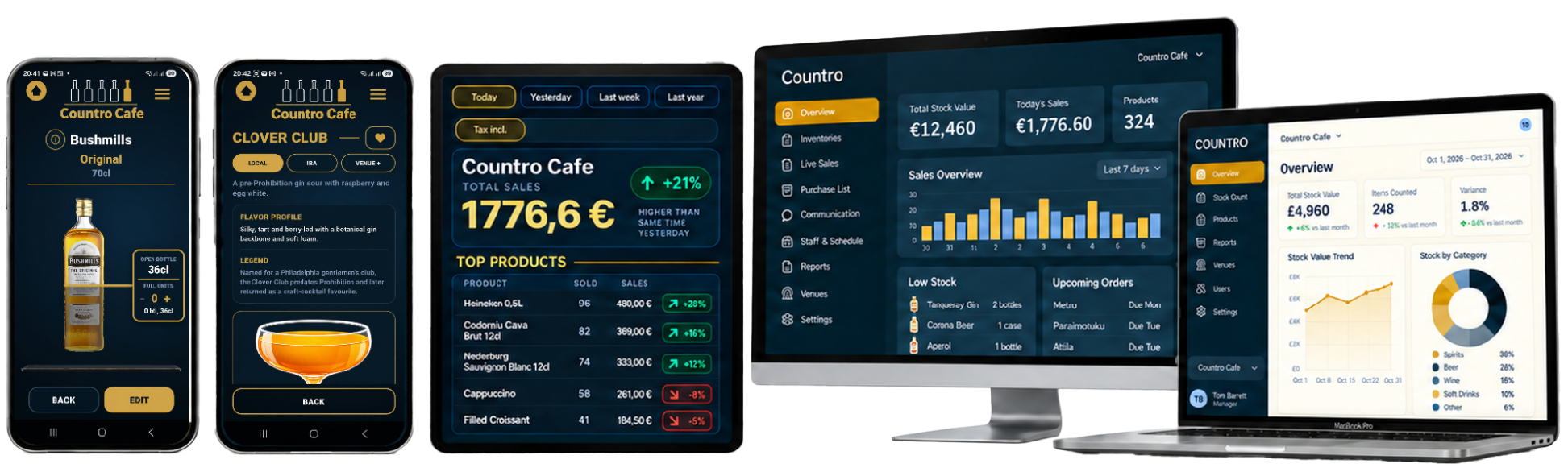
01 / WHY COUNTRO
COUNTRO closes the gap between what the POS records and what staff can physically see, count and manage.
02 / INVENTORY IN APP
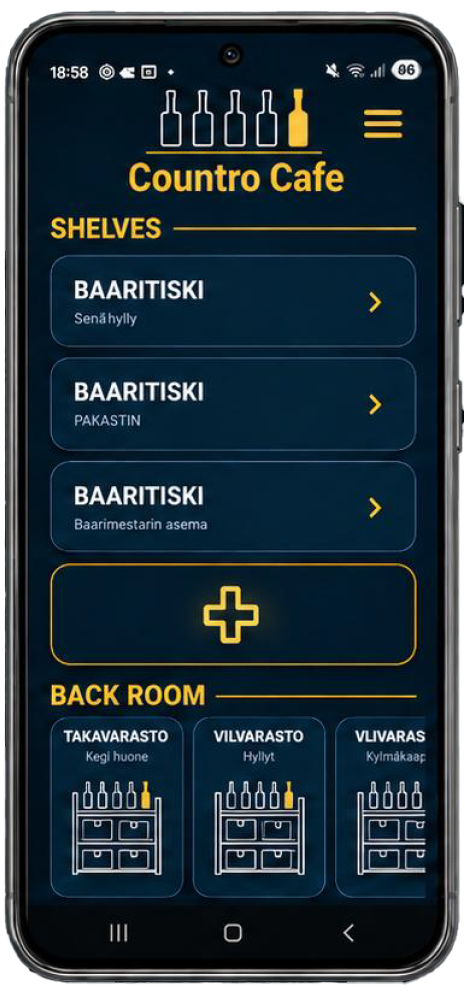
Built for the actual layout of your bar, not a spreadsheet disguised as a stocktake.
Mirror your venue and move products as the layout changes.
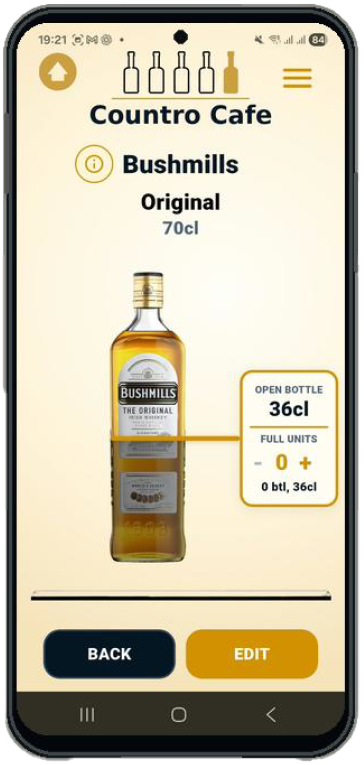
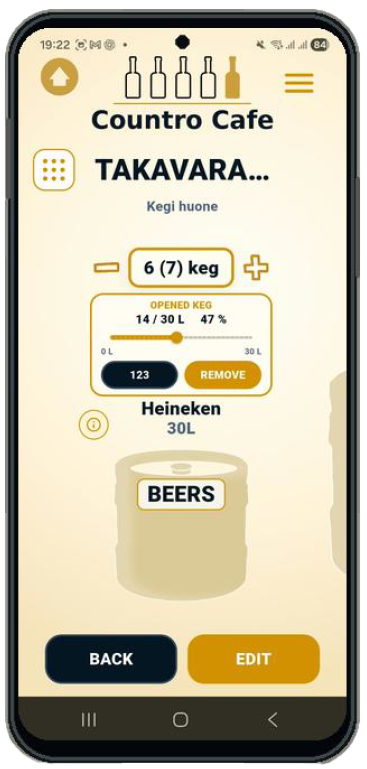
Track visible liquid levels alongside full bottles and cases.
Count beer, cider, wine, kegs, mixers and other stock in their own flow.
03 / PRODUCTS IN APP
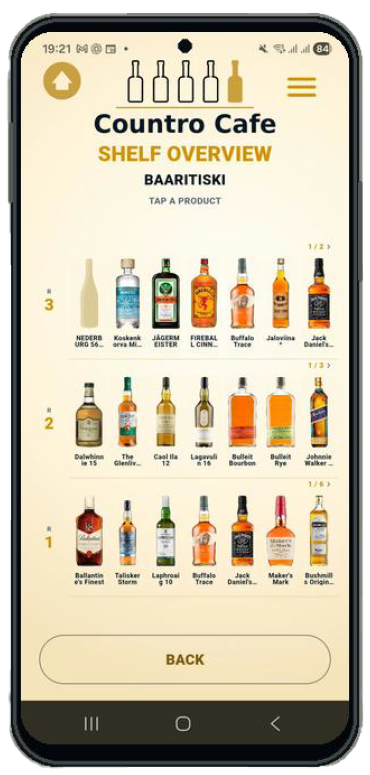
From the first bottle added to the last one counted, keep reliable product knowledge connected to stock.
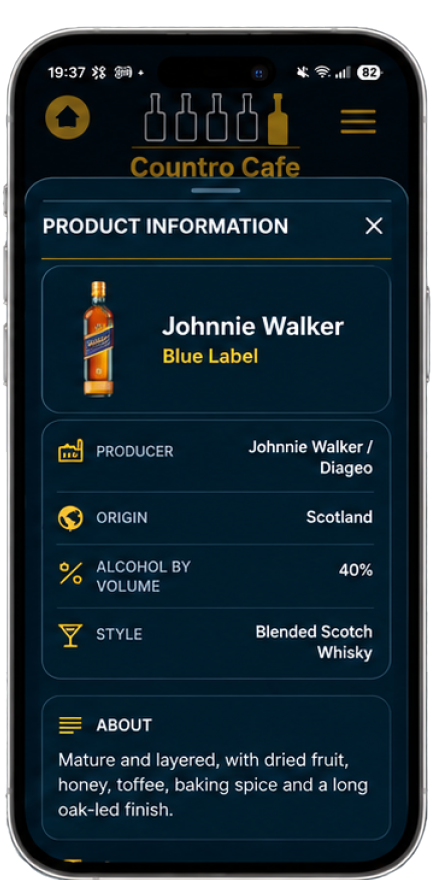
Choose a known product or let photo-assisted recognition propose a match.
Keep product identity, silhouettes and useful information attached to the correct item.
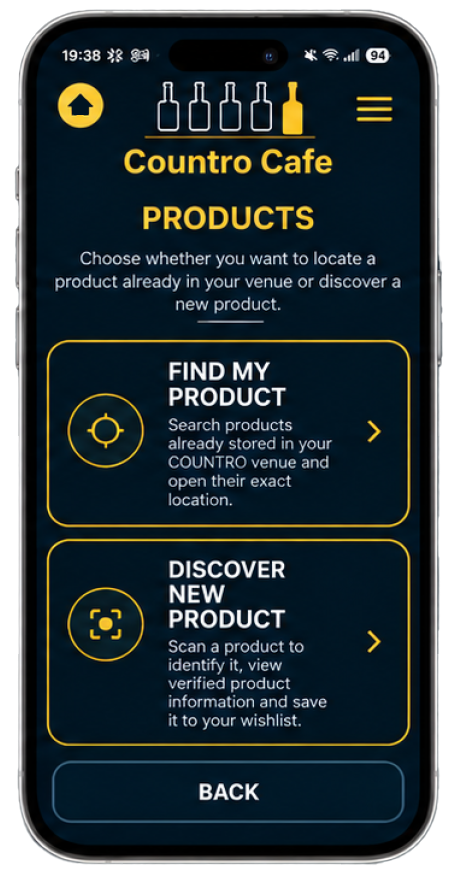
Locate what you own and add interesting products to your Wishlist.
04 / SUPPLIER RECEIVING
Less paperwork, fewer unchecked assumptions. BARBACK reads the document; your team verifies what physically arrived.
Create supplier-specific order lists, record quantities and keep a send-by deadline.
Photograph and crop the delivery note. BARBACK proposes product matches and quantities.
Verify physical counts, including unplanned items, missing products and returned packaging.
Save a receiving record, review changes and place approved new stock in the chosen area.
AI-assisted receiving is designed for staff confirmation, not unattended inventory changes.
 STOCK-AWARE COCKTAIL LIBRARY
05 / COCKTAILS IN APP
Updated monthly. A growing recipe reference, built around what your venue actually has available.
Ingredient status distinguishes exact matches, substitutions, missing and unconfirmed items.
Discover similar drinks when the original ingredients aren't available.
Save venue-specific recipes, techniques and garnishes alongside reference recipes.
06 / THE EVERYDAY TOOLKIT
What happens around the stock matters just as much as the stock itself.
ORDERING
Collect what you need, assign suppliers and organize quantities and deadlines.
AVAILABLE IN APPREPORTING
Produce stocktake reports, review previous inventories and account for taxes and deposits.
AVAILABLE IN APPLOCALISATION
Venue-level currency, units, language and tax/deposit settings support expansion.
JAPANESE PILOT / IN VALIDATION07 / COMMUNICATION IN DEVELOPMENT
COUNTRO brings the everyday work behind service into one place, alongside the stock your team already manages.
Communication screens are available as development previews. Availability for external testers will be confirmed during the pilot.
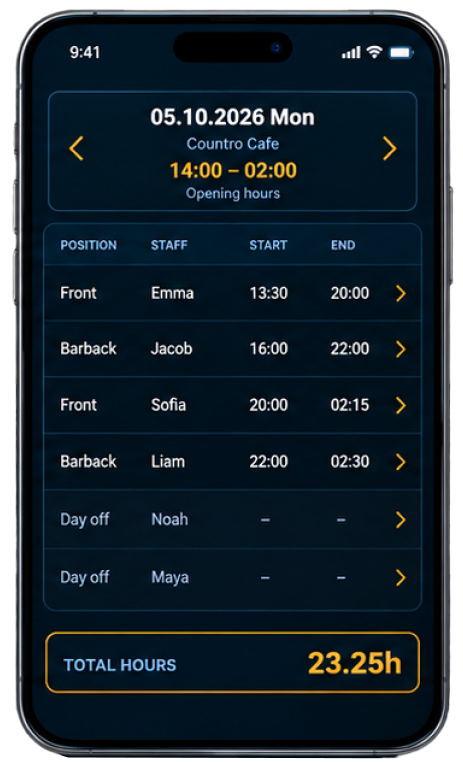
Give everyone a clear view of their shifts and the venue roster. Keep upcoming work organized in the same place as stock and operations.
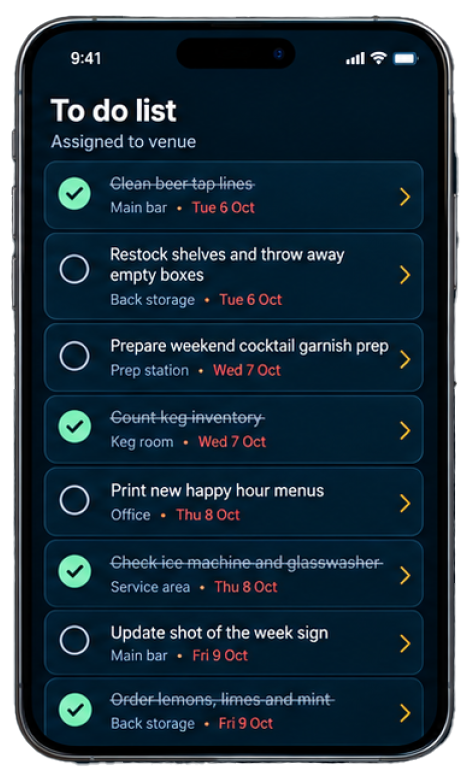
Turn recurring checks and one-off assignments into trackable tasks. Make ownership and completion status clear across shifts.
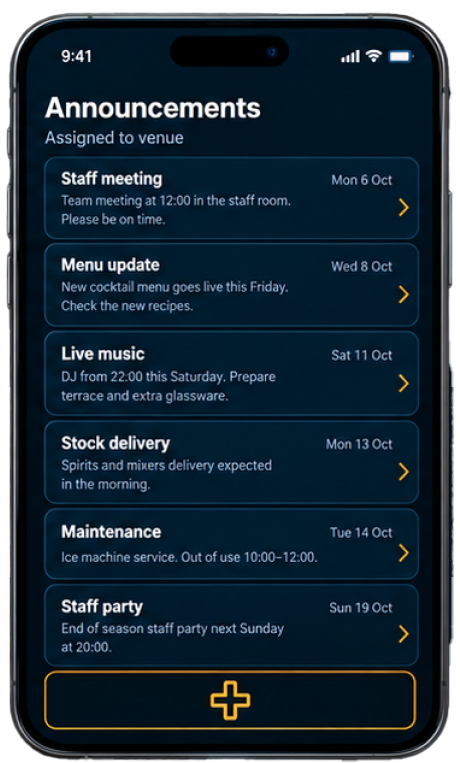
Keep staff informed about deliveries, events, shift notes and important venue updates without losing context between shifts.
08 / LOOKING AHEAD
We've separated the working core from the longer-term vision. These capabilities are planned or being developed, not represented as live integrations.
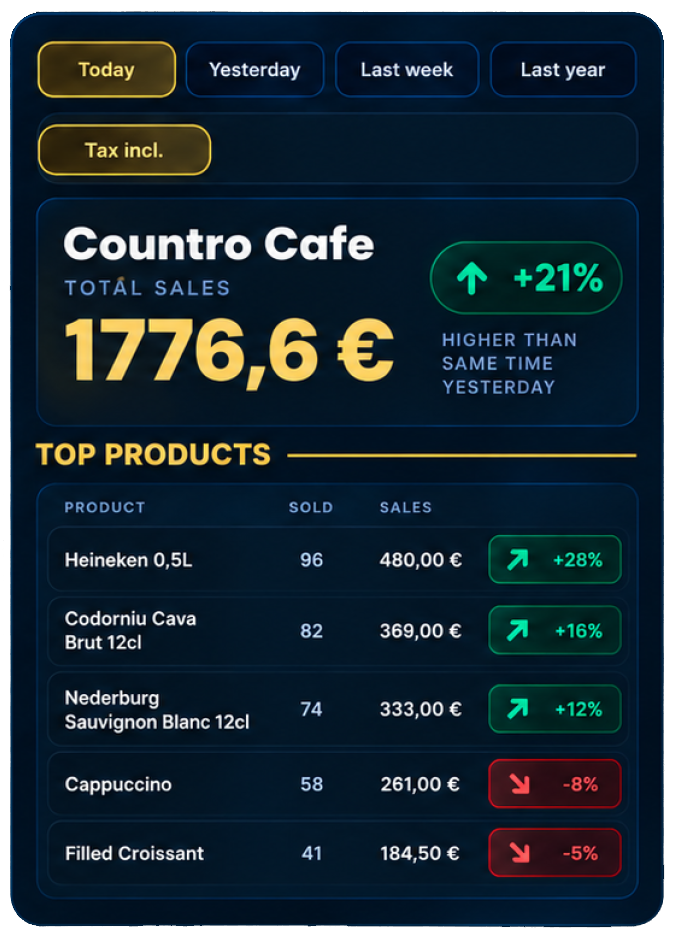
Connect authorized sales data to counts and deliveries to investigate variance.
Expand team scheduling, announcements and tasks from development previews to supported pilot workflows.
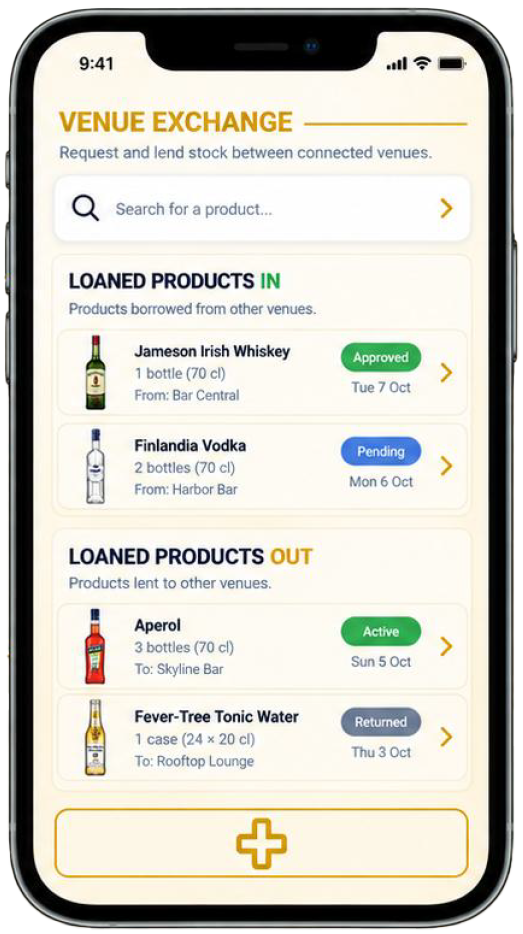
Track stock requests, temporary transfers and returns between connected venues.
Browser-based analytics and controls for teams operating multiple venues.
09 / SUBSCRIPTIONS
Indicative subscription structure from our product roadmap. Billing and availability will be confirmed before launch.
Core stock control for independent hospitality venues.
Venue-based subscription with three included mobile accounts. Additional mobile access is billed separately.
Prices shown are proposed, not an active offer. Features described as planned are not yet generally available.
10 / COUNTRO PRIVATE PILOT
We're opening COUNTRO to selected venues, starting with Finland and expanding testing internationally. Tell us about your venue or use an invitation you've already received.
11 / FREQUENTLY ASKED
Explore how COUNTRO handles inventory, reporting, team workflows and venue information. Pilot features and planned tools are clearly distinguished.
No. COUNTRO is designed to complement an existing POS. Stock counting, products and delivery receiving are its focus. Authorized POS data integrations are planned.
Independent bars, pubs, restaurants, cafés, clubs and other hospitality venues that manage physical stock across shelves and storage areas.
Create shelves and back-room areas to match the layout of your venue. Count products where they are stored, including bottles, cases, kegs and other stock units.
Yes. COUNTRO can track remaining liquid in supported opened bottles alongside full bottles, boxed products and back-room quantities. Staff verify the physical stock rather than relying only on sales estimates.
Photograph a supplier delivery note. BARBACK suggests the products and quantities it recognizes, then staff verify the physical delivery before anything is confirmed. An AI suggestion is never the final stock count.
The receiving checklist can compare the note with what actually arrived, including zero received, unexpected products and negative packaging-return lines. Unregistered incoming products can be added to an inventory area or recorded for later.
COUNTRO includes current stock values, monthly inventories and previous inventory records. Reports can focus on selected shelves or back rooms, with quantities and value information based on the venue settings.
Yes. Inventory report and print options let you choose the stock sections and valuation details to include, then print or save the result as a PDF using your device. Available tax and deposit breakdowns depend on the configured products and country rules.
Supplier orders and receiving records are kept for operational review. Broader PDF reporting on purchasing trends, sales performance and business results is planned as the related data integrations and PRO reporting tools develop.
Staff scheduling, to-do lists and announcements are part of the developing team workspace. Dedicated staffing, hours and communication PDF reports are planned, but are not yet offered as generally available exports.
COUNTRO stores the information needed to operate a venue, such as account and venue details, stock locations, product quantities, supplier lists, receiving records, inventory history and local settings. Staff should only enter information needed for venue operations.
COUNTRO maintains app data and uses venue-linked server backups for operational records. Completed inventories trigger a server save. Synchronization still depends on connectivity, so an in-progress change should not be treated as backed up until its save has completed.
Venue stock and operational records are organized by venue, not as a public shared catalogue. Sharing selected Signature cocktail lists with other COUNTRO venues is a separate, planned opt-in feature. Access controls are being verified for the wider pilot.
Images submitted for BARBACK analysis are processed to read the document and propose matches. Staff review the results, and delivery records may include the original note for reference. The final privacy notice will describe processing partners and retention practices before public signups open.
Contact COUNTRO by email at ivan@countro.app for questions about your venue data or account. The public privacy notice and formal data-request procedures are being finalized before open registration.
COUNTRO is preparing a controlled pilot. Joining the waitlist registers interest; approved testers are contacted separately. It does not provide immediate account access.
COUNTRO includes venue-level currency, measurement and tax settings and established English, Finnish, Swedish, Russian and Spanish UI support. Japanese localization is undergoing pilot validation.
Not as a generally released product. Browser overview, deeper analytics and some team features are part of the planned PRO / Enterprise roadmap.
The proposed BASIC price is €15 per user per month. PRO is planned at €38 per venue per month with three mobile accounts included; each additional mobile user is €10 per month. Final commercial terms will be confirmed before launch.
COUNTRO is being prepared for phones and tablets in portrait and landscape. Browser and desktop management views are part of the wider product plan, with availability confirmed as pilot testing progresses.
Your selected country sets a starting profile for currency, measurement, tax/VAT and deposit or returnable settings where available. You can review these in Account Info. Your interface language is a separate choice, so an international team can use another language.
COUNTRO uses the venue currency and configured tax/VAT rules in stock valuation and applicable reports. Country defaults are a starting point, not a guarantee that every product or transaction uses the same rate. Your team should review the values required for its venue.
For Finnish venues, PALPA and other configured deposits or returnable packaging can be represented separately from product stock. BARBACK receiving preserves negative return lines from delivery notes, such as empty kegs or PALPA containers. Supported reports can include deposit values when configured, and staff verify the scanned quantities.
COUNTRO is designed to support local returnable items, units and deposit values rather than applying Finnish PALPA rules worldwide. Availability and defaults depend on the market and product setup. Local rules must be checked before relying on deposit calculations.
Local wholesaler information and supplier catalogues are planned for later development. Today, venues can create their own suppliers, assign products and prepare supplier-specific order lists. Future country-specific listings will depend on reliable supplier data and permission to use it.
Not yet. COUNTRO currently helps staff build supplier-specific order lists, quantities and ordering deadlines, which they send through their existing supplier channels. Direct order submission is planned where wholesalers offer suitable, authorized integrations. Staff will remain responsible for reviewing an order before it is sent.
12 / ABOUT COUNTRO
EXPERIENCE BEHIND COUNTRO
60+Years of combined hospitality experience
About the team
COUNTRO was created by a team of hospitality experts with a combined experience of over 60 years. The idea began behind the bar: stock counting should follow how a venue actually works, not force staff into spreadsheets.
Developed and maintained in Finland by Corkscrew Creative Oy, COUNTRO is built for hospitality teams everywhere.
Questions, pilot enquiries or partnerships? Reach us directly by email.